How to Gather Customer Feedback: A Guide for Growth
Let’s be honest, collecting customer feedback often feels like shouting into the void. You send out that annual survey, cross your fingers, and get back a handful of vague responses that are impossible to act on. For product-led teams that need to move fast, this old-school approach is a dead end.
Rethinking Your Customer Feedback Strategy
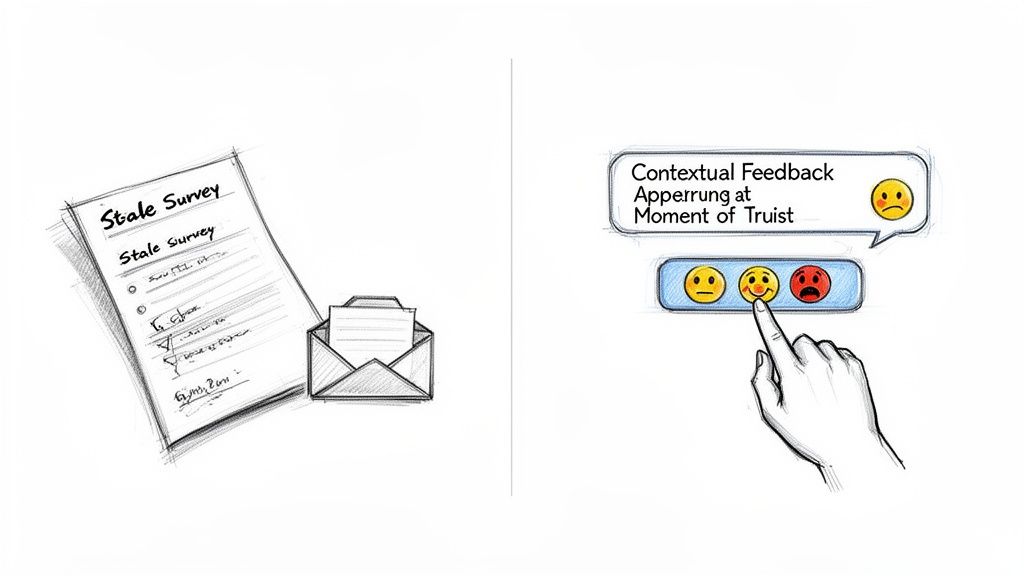
The problem with traditional feedback methods is they’re completely detached from the actual user experience. By the time a customer gets your survey email, they’ve long forgotten the minor friction point or the tiny moment of delight they felt last Tuesday. You end up with generic, low-quality data or, worse, radio silence.
It’s time for a fundamental shift.
From Static Forms to Real Conversations
A modern feedback strategy is built on a simple but powerful idea: meet customers where they are. Instead of yanking them out of their workflow with a clunky survey, you invite feedback right at the moment of truth—when they’re thrilled, confused, or frustrated inside your product.
This means you stop thinking about "collecting data" and start thinking about "starting conversations." A lightweight, in-app widget that asks one simple, relevant question is infinitely more valuable than a 10-question survey. It respects your user’s time and captures their thoughts while the context is still crystal clear.
The table below breaks down just how different these two approaches are.
Traditional vs Modern Feedback Collection Methods
| Attribute | Traditional Methods (e.g. Annual Surveys) | Modern Methods (e.g. In-App Widgets) |
|---|---|---|
| Timing | Scheduled, often annually or quarterly | Real-time, triggered by user actions |
| Context | Low; detached from the specific experience | High; captured at the point of interaction |
| User Effort | High; requires leaving the product to fill a form | Low; a quick click or short text entry |
| Response Rate | Typically low (<10%) | Significantly higher |
| Data Quality | Generic, often vague or outdated | Specific, contextual, and actionable |
| Sentiment | Biased towards extreme highs or lows | Captures a wider, more nuanced range of sentiment |
The contrast is stark. Modern methods don't just get you more feedback; they get you better feedback that your team can actually use.
Why Context Is Everything
The real challenge isn't just getting more comments; it's separating the signal from the noise. A comment like "This is confusing" is completely useless on its own.
But what if you captured that same comment along with the user’s session replay, their current URL, their browser version, and their MRR? Suddenly, it’s not just a complaint; it's a high-value, actionable insight from a priority customer.
That’s how you build a system that tells the full story. It gives your team the power to understand not just what the problem is, but who it's impacting and why it's happening. The stakes for getting this right are massive. Consider that 72% of consumers have reportedly switched brands in the last year because of poor experiences.
To truly future-proof your strategy, it's worth exploring the possibilities of automating feedback collection with AI-driven tools.
The goal is to make giving feedback feel less like a survey and more like a helpful chat. When you make it easy and conversational, you unlock a continuous stream of insights that guide your product roadmap and slash churn.
This guide is your playbook for designing, deploying, and operationalizing a customer feedback system that does exactly that. Let's get started.
Picking Your Channels and Asking the Right Questions
Where and how you ask for feedback matters just as much as what you ask. If you just slap a generic "How can we improve?" pop-up on every page, you're practically begging to be ignored. The real secret to getting high-quality feedback is picking the right moments and crafting questions that feel like a natural part of the conversation.
The goal is to be helpful, not annoying. This means you have to ditch the one-size-fits-all approach and get strategic about how you engage with users based on what they're actually doing in your product.
Where to Collect Feedback
Not all channels are created equal. The smartest approach is to use a mix of proactive and passive methods to catch insights at every stage of the customer journey.
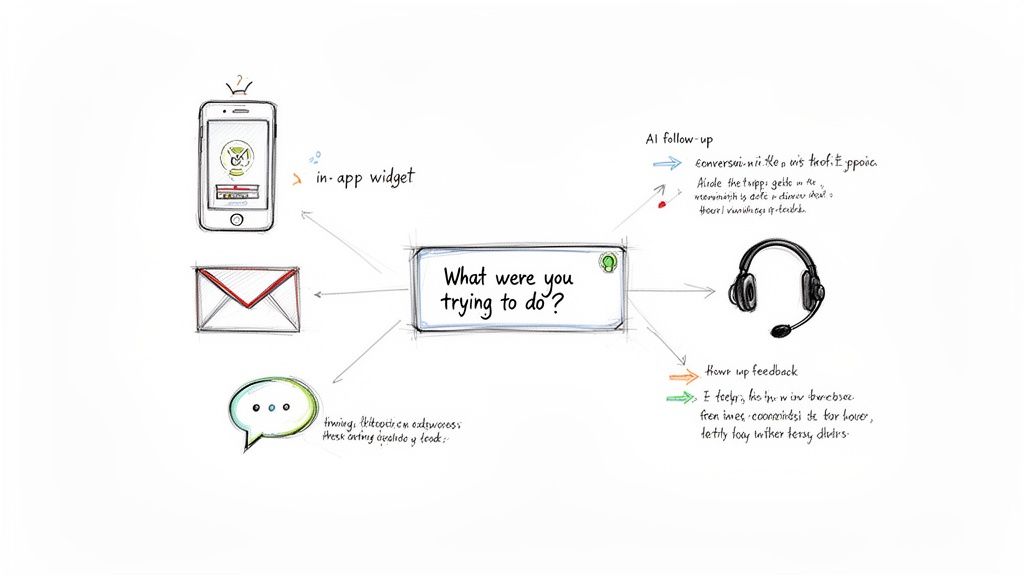
In-App Widgets: These are the gold standard for getting feedback right in the moment. A simple, lightweight widget lets a user share a thought without derailing their workflow. It's perfect for capturing that immediate reaction to a new feature or a flash of frustration with a confusing UI.
Targeted Email Surveys: Forget mass email blasts—they rarely work. But a super-targeted email? That can be incredibly powerful. Imagine sending a specific survey only to users who just tried an advanced feature, or to a cohort that hasn't logged in for 30 days.
Customer Success Check-Ins: For your high-value accounts, you can't beat a real conversation. Proactive check-ins from your CS team can unearth deep strategic insights that a form will always miss. This is where you learn about their bigger goals and what's really holding them back.
Help Docs and Knowledge Base: A simple "Was this article helpful?" prompt at the bottom of a support doc is an easy win. It gives you a constant, low-effort pulse on how well your self-service resources are working. A string of "No" votes is a massive red flag that an article is confusing or out of date.
Writing Prompts That Actually Get a Response
The quality of your feedback is a direct reflection of the quality of your questions. Generic prompts get generic, useless answers. You have to be specific, timely, and sound like a human.
Instead of asking, "How are we doing?" try triggering prompts based on what a user just did. This tactic doesn't just boost response rates; it gives your team the rich, actionable context they need to make sense of the feedback.
Don't ask for feedback; invite a conversation. A prompt like, "What were you hoping to accomplish on this page?" is far more insightful than a generic rating scale. It opens the door to understanding user intent, not just satisfaction.
This subtle shift in framing is a game-changer. It turns a transactional data-grab into a genuine attempt to help the user. It's a core principle of improving customer communication and building much stronger relationships along the way.
Real-World Examples of Smart Prompts
Let’s get practical. Here are a few scenarios where a well-timed, contextual prompt can unlock a goldmine of insights.
Scenario 1: The User Completes a Key Workflow
- Trigger: A user successfully exports their first report.
- Bad Prompt: "Rate your experience."
- Good Prompt: "Congrats on your first export! Was there anything in that process that felt slower than you expected?"
- Why it works: It’s specific, positive, and zeros in on a potential pain point—speed—while the experience is still fresh in their mind.
Scenario 2: The User Hits a Snag
- Trigger: A user lands on a "404 Not Found" page or gets an in-app error message.
- Bad Prompt: A generic contact form.
- Good Prompt: "Oops, that wasn't supposed to happen. Could you tell us what you were trying to do right before this?"
- Why it works: It’s empathetic and immediately helps your team trace the user's steps to replicate the bug.
Scenario 3: The User Is Showing Purchase Intent
- Trigger: A user on your Free plan visits the pricing page for the third time in a week.
- Bad Prompt: "Any questions?"
- Good Prompt: "Exploring an upgrade? We'd love to know if there's any information missing here that would help you decide."
- Why it works: It acknowledges their behavior and proactively seeks to resolve specific blockers to conversion.
These examples show how you can turn a simple comment into a rich story. By meeting users in the right place, at the right time, and with the right question, you start building a feedback system that truly fuels product growth.
Capture the Full Story: Why Context is Everything
A feature request without context is just noise. I’ve learned this the hard way. The real magic isn't in the feedback itself, but in the rich story that comes with it. The difference between a useless comment and a game-changing insight is the "why" and "who" behind it.
To really get this right, you need a system that automatically captures the full picture for you.
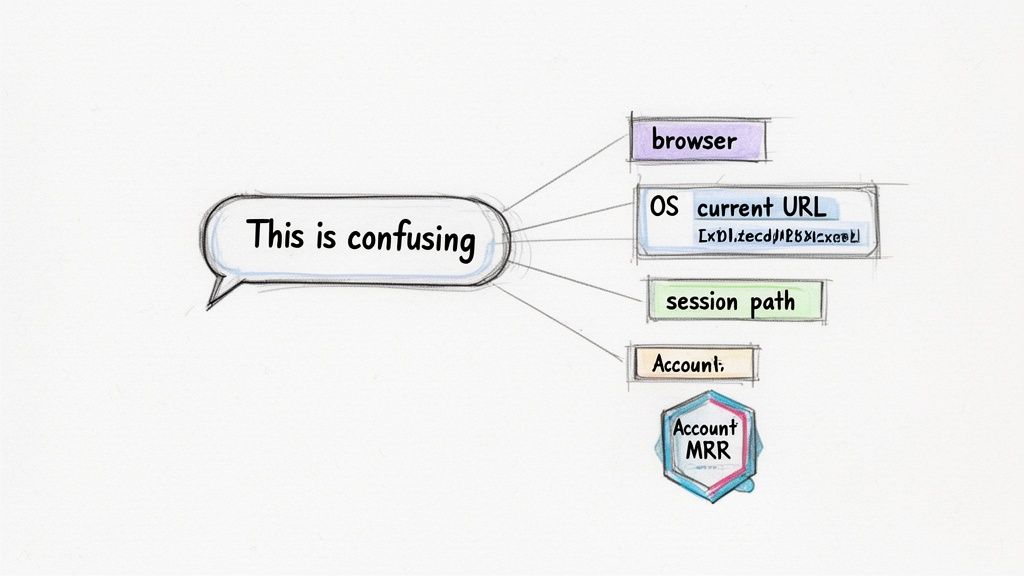
Think about it. When a user says, "This is confusing," what does that actually mean? Without context, your team is stuck playing a frustrating game of twenty questions, burning through time and goodwill. But when that same comment is instantly paired with a rich layer of data, it becomes a real, actionable starting point.
Automatically Grab the Technical Details
First things first, you need the technical environment. A modern feedback system should automatically snatch all the essential details your engineering team needs to replicate a bug or understand what a user was experiencing. For any product-led team that wants to move fast, this is non-negotiable.
This simple step completely eliminates that painful back-and-forth that usually follows a bug report. A user reports a broken button, and your team already has everything they need without asking a single follow-up question:
- Current URL: Exactly which page were they on when it all went wrong?
- Browser and OS: Instantly flag potential compatibility issues. (You know, the classic "This only happens on Safari 15.2" problem.)
- Screen Resolution: Helps your front-end team diagnose those tricky layout bugs that only pop up on specific screen sizes.
- Session Journey: This is gold. It shows the sequence of pages the user visited before giving feedback, revealing their workflow and what they were trying to accomplish.
Capturing this metadata is like having a black box recorder for your product. It gives your team the exact coordinates of a problem, turning a vague complaint into a reproducible bug they can knock out in hours, not days.
This is a fundamental shift. It respects your user's time by not making them dig up information your product should already know, and it lets your engineers get straight to solving the problem.
Enrich Feedback with Your Customer Data
The second layer of context is where things get really powerful. This is about connecting feedback to your own business data. By integrating your feedback tool with your CRM or data warehouse, you can enrich every single submission with crucial business metrics.
This is how you graduate from just fixing bugs to making truly strategic product decisions. A simple comment suddenly carries immense weight when you see who it came from. For a continuous stream of insights from your support calls, you can even use tools for customer support transcription to make sure no detail gets lost.
Key Data Points That Change Everything
Connecting feedback to customer data gives you a powerful new lens for prioritization. You can immediately see the business impact behind every request.
- MRR (Monthly Recurring Revenue): Is this request from a user on your Free plan or from an enterprise account worth $50,000 a year? That single data point changes the entire conversation.
- Plan Type: If someone on your basic plan is asking for an advanced feature, that's not just feedback—it's a potential upgrade opportunity.
- Account Health Score: A critical request from an account with a low health score becomes a high-priority churn risk that needs immediate attention.
- Account Owner: The right Customer Success Manager can be looped in instantly to follow up personally and manage the relationship.
With this data attached, "This is confusing" transforms into "This high-value customer on our Enterprise plan is stuck during onboarding, and their account health is declining." One is noise; the other is a fire alarm demanding immediate action. This is the real goal: turning raw comments into a prioritized, revenue-aware roadmap.
Clustering and Prioritizing Feedback by Business Impact
Okay, so your feedback channels are finally humming. Ideas, bug reports, and little bits of genius are flowing in from your in-app widgets and those targeted emails you’re sending. That’s the good news. The bad news? You’re now staring at a mountain of raw, unstructured comments.
This is the point where a lot of teams get stuck. They’re drowning in data they can’t actually use. The common reflex is to just start counting votes. Fifty people asked for a “dark mode,” so it shoots to the top of the backlog. While that feels democratic, it's a dangerous trap. You risk chasing popular-but-minor requests from low-value users while completely missing the critical needs of the customers who truly drive your business.
Using AI to Find the Signal in the Noise
Before you can prioritize anything, you have to get organized. Manually sifting through hundreds of comments, trying to tag and categorize everything, is a one-way ticket to burnout and messy, inconsistent data. A much better way is to use semantic clustering. It’s an AI-powered technique that intelligently groups similar feedback together, even when people use completely different words to describe the same problem.
For instance, your system might get these three separate comments:
- "I wish I could connect my accounting software."
- "A direct integration with QuickBooks would save me hours."
- "Why can't I export my data for my bookkeeper?"
A simple keyword search would miss the link between them. But semantic clustering gets the intent. It sees these are all part of the same theme—let's call it "Add Accounting Integration"—and groups them together instantly. This cleans up your inbox, gets rid of duplicates, and reveals powerful trends you might have otherwise missed entirely.
Moving Beyond Votes to Revenue-Driven Prioritization
Once your feedback is clustered into clear themes, the real work begins. Instead of just tallying up votes, the most strategic product teams weigh feedback by its impact on the business. The question shouldn't be, "What's the most popular request?" It needs to be, "What will actually have the biggest impact on our revenue and retention?"
To do this, you have to connect each piece of feedback to your customer data—specifically, their Monthly Recurring Revenue (MRR).
This shift is fundamental. It moves your product strategy from a reactive popularity contest to a proactive, revenue-driven operation. You start building what your most valuable customers need, directly tying your roadmap to real business growth.
Your priorities become crystal clear when you can see the total MRR attached to each feature request. A minor UI tweak requested by 20 users on your Free plan might represent $0 in MRR. But an enterprise-grade security feature requested by just three customers could represent $150,000 in ARR. Suddenly, the choice of what to build next is obvious.
We go much deeper into this concept in our complete guide on how to prioritize your product backlog with a focus on business value.
Creating Your Revenue-Weighted Feedback Dashboard
The most practical way to put this into action is to build a feedback dashboard. But not just any dashboard. This one needs to visualize not just what people are asking for, but who is asking and how valuable their business is to you.
At a glance, this dashboard should answer a few key questions:
- What are our top 5 feature requests by total MRR? This shows you exactly what you need to build to retain high-value accounts.
- Which bugs are impacting our highest-paying customers? This is your churn-prevention checklist.
- What are the most common requests from users on our Pro plan? This can uncover fantastic upgrade incentives to bake into your marketing.
This level of insight is no longer a "nice-to-have." We live in a world where 52% of US consumers expect a response from a brand within an hour. Yet, 39% wait over two hours, which creates massive frustration. Making quick, data-informed decisions shows your customers you're listening. That’s how you build loyalty. You can discover more insights from the 2023 Global Customer Experience Report.
By clustering your feedback with AI and then prioritizing it with real revenue data, you draw a straight line from customer needs to business outcomes. This is how you confidently decide what to build next, knowing every single decision is backed by data that actually matters.
Integrating Feedback Into Your Team Workflow
Collecting rich, contextual feedback is a huge win, but it’s only half the battle. If those insights just sit in a dashboard or a weekly report, they lose their power almost immediately. Think of feedback as fuel—it needs to flow directly into the engine room where your team builds, fixes, and innovates. The best feedback collection strategy ensures that insights don't just get collected; they get seen and acted upon, often in near real-time.
This is where integrating your tools is non-negotiable. By connecting your feedback platform to the apps your team already lives in, you turn feedback from a chore into a seamless, automated part of your daily operations. You're basically removing all the friction that causes great ideas to get lost in the shuffle.
Piping Feedback Directly Into Slack
For most product-led teams, Slack is the central nervous system. It's where conversations happen, decisions get made, and fires are put out. Sending feedback directly into dedicated Slack channels makes those critical insights impossible to ignore. It’s a simple automation, but its impact on your team’s responsiveness can be massive.
Just imagine how this plays out in the real world:
A High-Value Customer Is Unhappy: A user from an enterprise account with $100k ARR leaves a frustrated comment. Instead of you finding it in a report days later, an instant notification hits your
#feedback-urgentchannel, tagging the account’s Customer Success Manager and the Head of Product. Problem spotted, team alerted.A Bug Report Comes In: Someone flags a broken button. The feedback, complete with the user's browser, OS, and session context, is immediately posted to the
#engineering-bugschannel for triage.A Feature Request Surfaces: A new idea for an integration is submitted. It pops up in the
#product-ideaschannel, sparking an immediate discussion among your product managers.
This approach makes feedback visible and, more importantly, collaborative. It shrinks the time from insight to action from days down to minutes.
Your goal is to make feedback ambient. It shouldn't be something your team has to go look for; it should be a natural and constant part of their environment, surfacing in the tools they already use every day.
When you set up these automations, you start building a culture of customer-centricity where the user’s voice is always part of the conversation.
From Feedback to Actionable Tickets in GitHub and Jira
Beyond just sending notifications, the real magic happens when you turn feedback directly into actionable work items. This is about eliminating manual data entry and making sure all that rich context you captured actually makes it into your project management tools like GitHub or Jira.
This flow shows how you can turn that raw feedback into prioritized tasks.
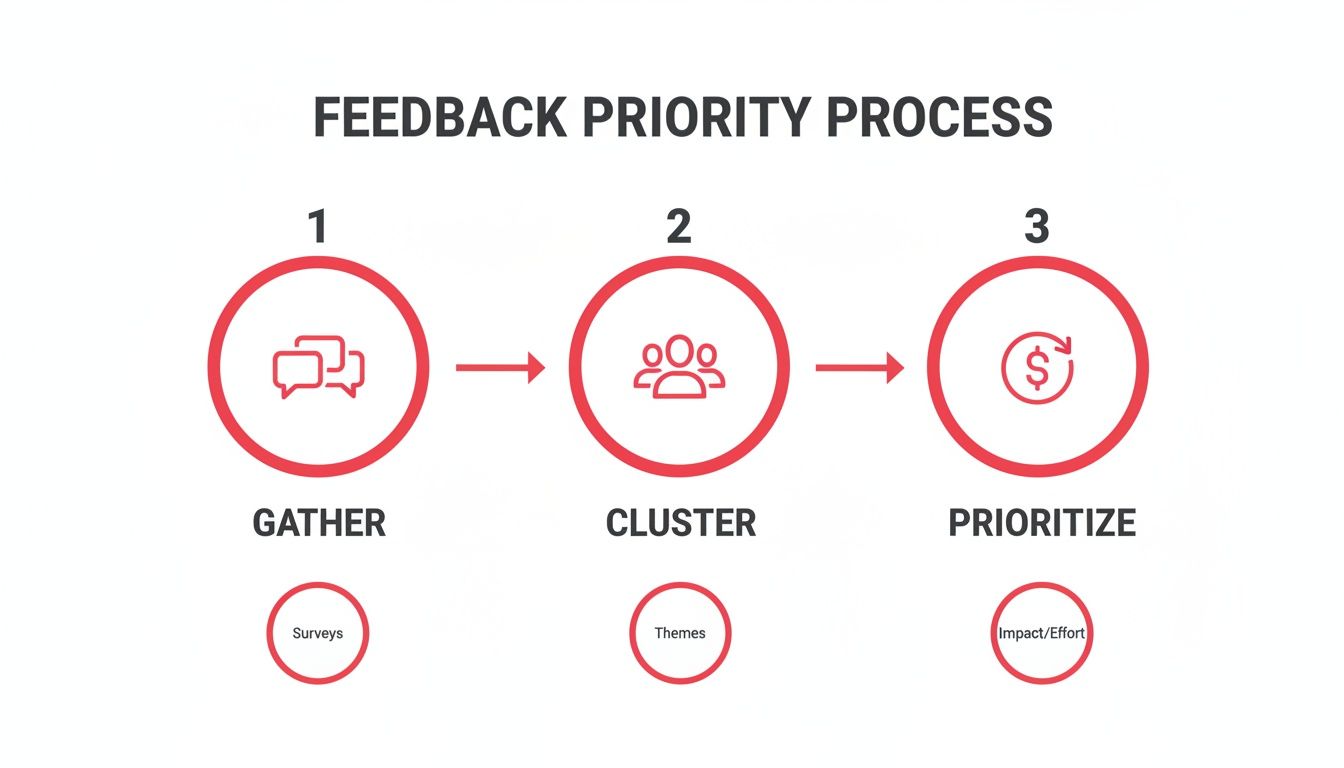
The idea is to make sure feedback isn't just heard, but systematically evaluated and prioritized based on its real-world business impact.
For instance, when a user submits a bug report, you can set up a rule to instantly create a new issue in GitHub or Jira. This ticket can be automatically pre-filled with everything you need:
- The user's original comment as the issue description.
- Technical metadata like their browser, OS, and the URL they were on.
- Customer data like their MRR and plan type, added as labels.
- A link back to the original feedback for full context.
This alone saves product managers hours of soul-crushing admin work and gives engineers everything they need to start digging in. Of course, managing this is much easier with a dedicated customer feedback management platform built for these kinds of deep integrations.
Unlocking Infinite Possibilities with Zapier and Webhooks
While direct integrations with tools like Slack and GitHub are table stakes, every team’s workflow has its own quirks. This is where a tool like Zapier or custom webhooks becomes your best friend. They act as a universal connector, letting you pipe your feedback data to virtually any other application your team relies on.
The possibilities here are pretty much endless. You could:
- Update a CRM Record: When a user provides feedback, automatically add a note to their contact record in HubSpot or Salesforce.
- Build a Custom Dashboard: Funnel all feedback data into a Google Sheet or Airtable to create a live, shareable dashboard for the entire company.
- Trigger a Drip Campaign: If a user on your Free plan requests a premium feature, add them to a targeted email sequence in Mailchimp that highlights the benefits of upgrading.
By fully operationalizing your feedback loop, you guarantee that every valuable insight finds its way to the right person, in the right tool, at exactly the right time. This is how you close the gap between listening and doing—and turn feedback into your company's most powerful growth engine.
Common Questions About Gathering Customer Feedback
Even with the best playbook, you're going to hit a few snags when you start collecting feedback in the wild. It happens to everyone. Here are some of the most common questions I hear from product teams and how to think through them.
How Can I Get More Feedback Without Annoying People?
This is all about timing and context. The secret is to make your request feel helpful, not like an interruption.
Ditch the generic, screen-hogging pop-ups. Instead, trigger your feedback prompts based on what a user is actually doing. For example, when someone successfully exports their first report, that’s a perfect moment for a small, friendly prompt: "Glad you finished your report! Any ideas to make that process even smoother?"
Another great trigger is repeat behavior. If someone visits your help docs three times in ten minutes, a gentle slide-out asking if they found what they were looking for is a lifesaver, not an annoyance. The goal is to make giving feedback feel as easy as sending a quick chat message. A simple widget lets them share a thought and get back to work, which is a world away from a multi-page survey.
What's the Best Way to Handle Negative Feedback?
First, change your mindset. See critical feedback for what it is: a gift. It’s a chance to improve that a customer who just cancels their subscription would never give you. Your first move should always be to respond quickly, thank them for their honesty, and validate their frustration.
Don't get defensive. Your immediate goal isn't to solve the problem, it's to understand it. Use the context you've captured to see their journey. What were they trying to accomplish? Where did they hit a wall? Put yourself in their shoes.
Once you understand, you can act. If it's a bug, link their feedback directly to a ticket in GitHub. If it’s a missing feature, tie it to an idea on your roadmap. But the most important part is to close the loop. When you ship the fix or the feature, send them a personal note. That one simple action can turn an angry user into a lifelong fan. It's incredibly powerful.
How Do We Balance Loud Customers with the Silent Majority?
Ah, the classic "squeaky wheel" problem. The solution is to stop counting votes and start weighing impact. You need to enrich your qualitative feedback with quantitative data.
A request from ten users on your Free plan is valuable, but is it more important than a single request from an enterprise customer paying you $50,000 in ARR? Probably not, especially if that customer is a churn risk. Your system should connect feedback directly to customer data like MRR, plan type, and account health.
You can also use AI clustering to find the signal in the noise. This tech is great at spotting underlying themes that connect dozens of seemingly separate comments. It might group 50 different complaints and reveal a single, core usability issue that the "silent majority" is struggling with but not articulating. This data-driven approach ensures you're building for business impact, not just for the loudest voices in the room.
How Does Having a Free Plan Affect Feedback Gathering?
Having a permanent Free plan instead of a short-term trial is actually a huge advantage for collecting feedback. It creates a continuous, long-term environment for understanding how real people use your product.
You can create two distinct feedback loops. For your free users, focus your prompts on the limitations of their plan. Ask what friction they're hitting or what would convince them to upgrade. This gives you a constant stream of insights for improving your core product and your conversion funnel.
For your paying customers, you can get much more specific. Target your prompts around advanced features and complex workflows. This two-tiered strategy lets you gather broad usability feedback from your free user base while sourcing high-value, strategic insights from the customers who are already invested in your success.
Ready to turn all this customer feedback into your biggest growth driver? FeatureBot helps you capture, organize, and prioritize user requests with an AI-powered widget that feels like a conversation. Stop guessing what to build next and start listening to what your most valuable customers are telling you. Get started for free at featurebot.com.
Ready to capture better feedback?
FeatureBot helps you collect, organize, and prioritize user feedback with AI-powered conversations.
Get Started Free